





Recover from your premises
A local copy can avoid downloading all your data from the cloud. The benefit depends on the network, volumes and recovery method.
CLURK Box · Hybrid backup
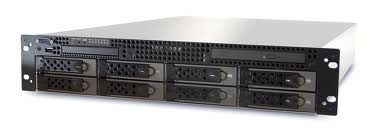
A dedicated appliance at your business organises local backups, combined with a remote copy according to the chosen architecture. Nearby storage for recovery, external backup to prepare for an on-site incident.
Your environments
From collaboration to virtualisation, identify the environments you want to protect.
Modules, editions, versions and permissions must be checked. A logo does not imply certification or support for every product from that vendor.
A local copy can avoid downloading all your data from the cloud. The benefit depends on the network, volumes and recovery method.
The external backup included in the offer complements the local copy to limit the consequences of theft, fire or appliance unavailability.
Bring supported backups together on dedicated equipment, with retention and support matched to your business.
Compatible workstations, servers, NAS and applications.
A local copy, with defined backup rules.
External backup to the storage specified in the contract.
The data path depends on the modules. According to your needs, the remote copy is created directly by agents or through a compatible replication mechanism. Its frequency and monitoring are defined in your project.
You have large files or environments to protect and want a copy on your network.
A deleted folder or an earlier version to find: a local copy makes retained data easier to access.
A hybrid architecture can reduce dependence on remote downloads for some recoveries. The off-site copy still depends on the available bandwidth.
You want dedicated equipment, a clear scope and identified responsibilities for monitoring.
 Files and shares
Documents, folders and accessible data on compatible workstations, servers and NAS.
System images, VMware, Hyper-V or Proxmox according to supported modules, formats and versions.
SQL Server, Exchange, MySQL and other compatible engines: application consistency requires the appropriate modules and prerequisites.
A local destination can complement your SaaS strategy when the module and execution mode allow it. The backup path is studied with you.
CLURK Box does not automatically add every module: we check the necessary permissions, licences and resources.
Explore all technologies and featuresDefine encryption, access and key custody. Advanced backup modes may impose specific constraints.
Adapt retained versions to your usage, storage capacity and recovery objectives.
Plan report analysis and recovery tests. Hardware alone does not guarantee a successful backup.
An immutable copy can complement the setup on a compatible destination configured for that purpose. It is not presented as active by default.
Identify critical data, current volumes, growth and recovery objectives.
Choose usable capacity, retention, modules and external-backup methods.
Define access, schedules and initial backups, then check that they run correctly.
Organise reports, alerts and recovery tests according to the chosen service.
Keep control or get assistance: the service level defines responsibilities for setup, monitoring and recovery.
You manage the solution with the application support included in the offer.
Backup monitoring and assistance according to the agreed scope.
Broader management of your solution and backup strategy.
An appliance is equipment dedicated to a backup service. The project combines the selected hardware, software functions, destinations and support. RAID storage alone does not replace a backup.
Local and remote copies address different incidents. Their combination is designed to avoid a local disaster affecting all your copies.
Backups to a local destination can continue if the required data and services remain accessible. External backup depends on the connection returning; exact behaviour is checked for each module.
Sizing considers volumes, daily changes, retention and growth. No universal capacity is specified before this study.
Some VM recovery functions require specific formats, resources and environments. CLURK Box is not presented as an automatic disaster-recovery platform; this possibility is studied separately.
These elements are specified in the proposal: equipment, storage, licences, installation, maintenance, remote copy and support level.
Tell us about your environments, volumes and recovery expectations. We will study the CLURK Box and external backup suited to your business.
Request a CLURK Box study →